
【仅供内部供应商使用,不提供对外解答和培训】
【仅供内部供应商使用,不提供对外解答和培训】
接口作用
模板制作过程中可以通过扩展单元格(或者悬浮元素)的右键菜单,满足模板制作的一些自定义功能,比如选择性粘贴
接口内容
主要接口
RightSelectionHandlerProvider
package com.fr.design.fun;

import com.fr.design.actions.UpdateAction;
import com.fr.design.designer.TargetComponent;
import com.fr.design.gui.imenu.UIPopupMenu;
import com.fr.design.mainframe.BaseFormDesigner;
import com.fr.design.selection.SelectableElement;
import com.fr.stable.fun.mark.Mutable;

import java.util.List;

/**
 * 设计器右键菜单接口
 */
public interface RightSelectionHandlerProvider extends Mutable {

    int CURRENT_LEVEL = 1;

    String XML_TAG = "RightSelectionHandlerProvider";


    /**
     * 对单元格或者悬浮元素的右键菜单项进行增删改
     *
     * @param ePane     选择的元素
     * @param popupMenu 右键主菜单
     */
    void dmlMenu(TargetComponent ePane, UIPopupMenu popupMenu);


    /**
     * 当前实现是否可以作用于当前元素
     *
     * @param selectableElement 当前选中元素分为CellSelection和FloatSelection(单元格和悬浮元素)
     * @return
     */
    boolean accept(SelectableElement selectableElement);


    /**
     * 对表单,参数面板内置的右键选项进行增删改处理
     *
     * @param actions 默认的action集合  注意:主体代码要求这边的action必须是UndoableAction 的子类而非updateAction
     */
    void dmlUpdateActions(BaseFormDesigner formDesigner, List<UpdateAction> actions);

    /**
     * 当前实现是否可以作用于当前元素
     *
     * @param formDesigner 当前选中元素分为表单编辑器和参数面板(表单组件元素以及各种控件)
     * @return
     */
    boolean accept(BaseFormDesigner formDesigner);

}
接口接入
<extra-designer>
    <RightSelectionHandlerProvider class="com.fr.plugin.designer.MyActionImpl"/>
</extra-designer>
示例效果
单元格右击的地方可以看到插件的菜单实现
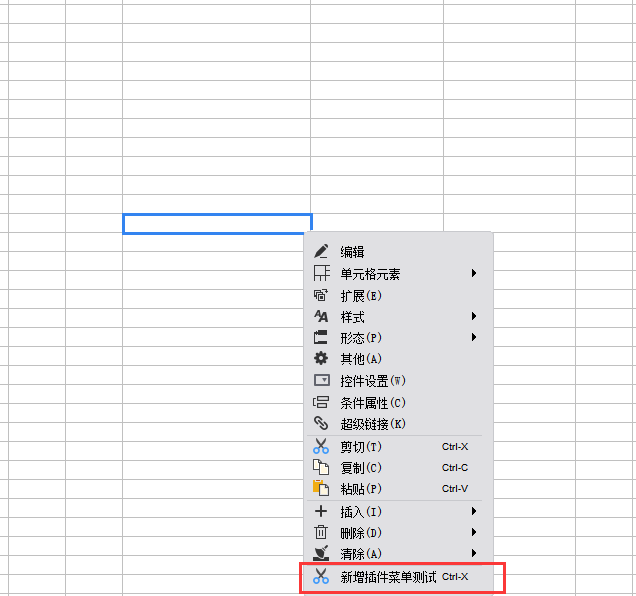
接口示例
示例源码:
Overview
Content Tools