Drop_Down_B toast样式包Demo:
.customToast {
    -webkit-box-shadow: rgba(0, 0, 0, 0.296875) 0px 1px 2px;
    background: #01b0f4;
    filter: alpha(opacity=90);
    -moz-opacity:0.9;
    opacity: 0.9;
    color: #FFFFFF;
    cursor: pointer;
    font-size: 13px;
    font-family: "PingFang SC", "Microsoft YaHei", "Myriad Pro", "OpenSans", Verdana, sans-serif;
    font-weight: bold;
    padding: 10px 20px 10px 20px;
    position: absolute;
    _position: absolute;
    line-height: 30px;
    width: 100%;
    z-index: 5;
    text-align: center
} |
function ($) {
    $.extend(FR.Msg, {
        toast: function(message){
            var $tabContent = $("div.fs-tab-content");
			/*要区分报表预览时的toast和平台上的toast的不同样式*/
            if($tabContent.length === 0){
                this.reportToast(message);
            }
            else{
                this.fsToast(message);
            }
        },
        fsToast: function(message){
            var toTop = -50;
            var $dv = $("div.fs-tab-content").children('div.customToast');
            $dv.css({
                opacity: 0
            });
            if ($dv.length === 0) {
                $dv = $("<div/>").addClass('customToast').css({
                    top: toTop
                }).appendTo("div.fs-tab-content");
            }
            $dv.text(message);
            $dv.show();
            $dv.animate({
                top: 0,
                opacity: 0.8
            }, 200);
            (function() {
                $dv.animate({
                    top: toTop,
                    opacity: 0
                }, 200);
            }).defer(3000);
            (function() {
                $dv.hide();
            }).defer(3200);
        },
        reportToast: function(message){
            var toTop = -50;
            var $dv = $("body").children('div.customToast');
            if ($dv.length === 0) {
                $dv = $("<div/>").addClass('customToast').css({
                    top: toTop
                }).appendTo("body");
            }
            $dv.text(message);
            $dv.animate({
                top: 0
            }, 200);
            (function() {
                $dv.animate({
                    top: toTop
                }, 200);
            }).defer(3000);
        }
    });
})(jQuery); |
插件包内的plugin.xml
/*除了上述的style.js等文件,不需要实现其他接口*/ <?xml version="1.0" encoding="UTF-8" standalone="no"?> <plugin> <id>com.fr.fs.plugin.customstyle.toast.[(defined toast name)]</id> <name><![CDATA[(plugin name)]]></name> <active>yes</active> <version>1.0</version> <env-version>8.0</env-version> <jartime>2015-01-07</jartime> <vendor>[(author name)]]</vendor> <description><![CDATA[(plugin description)]]></description> <change-notes><![CDATA[无]]></change-notes> </plugin> |
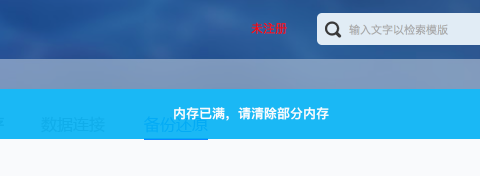
效果图如下:
toast样式插件开发的注意点
以下是在插件开发过程中需要注意的
(1) Default, Drop_Down_B, Popup_Right_B为保留字段,请不要以此为自定义样式名。
(2) 插件的包名为 com.fr.fs.plugin.customstyle.toast.[toast样式名(建议英文)]
(3) 平台上设置的toast样式名,最后会设置在resources目录下的customstyle.xml中