
【仅供内部供应商使用,不提供对外解答和培训】
Page History
Table of Contents
概要:一个主题的美观度是由大背景图片+主题配色+主题包三大部分共同决定的。整体配色主要由背景图片和配色决定,这些可以在决策平台-管理系统-平台外观里自己配置;整体的交互和布局主要是由主题包来完成的,代码写的越多,可以变化的东西也越多,当然背景图片和主题配色可以都通过开放的API来在主题包的代码中来修改,并不局限于平台外观配置。
如何以插件形式开发主题,可查看示例决策平台主题
主题包格式
| Code Block | ||
|---|---|---|
| ||
fs-theme-[主题名]  (注:主题名建议使用非中文)
        |----style.css   //导入样式
        |----theme.js      //导入脚本
        |----cover.png   //主题包封面( 建议尺寸240*170 )
|----其他目录(包括需要使用到的一些自定义资源文件) |
组件开放接口
框架中总共有5大组件,分别是框架布局,目录树组件,多tab组件,Navigation组件和Gallery组件。框架中总共有5大组件,分别是框架布局,目录树组件,多tab组件,Navigation组件和Gallery组件。如果需要的接口没有,可以到开发者龙门群里提(群号:179499938)。
| Code Block | ||
|---|---|---|
| ||
{
    isCustom: true, //是否是自定义主题
    name: 'myTheme', //主题名称
    //框架布局配置属性
    config4frame: {},
    //Navigation配置属性
    config4navigation: {},
    //目录树组件配置属性
    config4MenuTree: {},
    //多tab组件配置属性
    config4tabPane: {}
} |
...
| Code Block | ||
|---|---|---|
| ||
config4navigation = {
    onBeforeInit: null,  //初始化前事件
    onAfterInit: null,   //初始化后事件
} | ||
| Code Block | ||
| ||
config4Gallery naviComponents: { region: null //默认所在区域 } |
主题包开发
自定义主题包实为引入的外部js、css以及资源文件等。
为了使用主题接口,首先我们在theme.js里需要对FS.Theme配置进行扩展,具体代码如下:
| Code Block |
|---|
(function ($) { FS.THEME = $.extend(true, FS.THEME, {null //自定义导航栏组件, 可以往里面push自定义组件, 自定义render和onClick事件; } 其中: naviComponents = [ //默认有三项,可以覆写实现自己的样式,也可以往里面push自定义组件 navi : {...}, //可以覆写包括消息盒子用户信息和收藏 search: {...}, /**需要扩展的配置属性**/可以覆写搜索框 reg: {...} //注册情况 ] // naviComponents.item形如以下 { renderEl: }); })(jQuery); |
内置Classic主题采用默认配置:
Jquery对象
	render:Function
	onClick:Function
	visible:Boolean
}
注意:naviComponents中的接口有待完善,所以使用的时候尽量使用原class和id,以保证能够收到系统消息等。 |
| Code Block | ||
|---|---|---|
| ||
config4Gallery | ||
| Code Block | ||
{ config4frame: { resizableregion: true, null //上区域 默认所在区域 } |
主题扩展接口
框架中新增了对应主题自定义图标的接口,原有的图标均为图标字体形式,扩展后可以支持png图标的自定义配置。如果需要的接口没有,可以到开发者龙门群里提(群号:179499938)。
| Code Block | ||||
|---|---|---|---|---|
| ||||
FS.Plugin.CustomIcon.push({ //获取菜单节点的自定义图标 getMenuNodeCustomIcon: function north:(icon) { return null; }, visible: true //是否可见添加自定义图标到图标列表 addCustomIconItem : function(configSetting){ }, //下区域删除之前选中的自定义图标 removePreCustomIconSelected : function(folders) { south: {}, //添加自定义图标到目录节点上 addItem2Folders : function(eachFolder, $folders) { visible: false }, //是否可见初始化已经选中的自定义图标 initSelectedCustomIcon : function(selectedFolder) { }, //左区域获取自定义图标的附件ID getCustomIconAttachID : west:function (folder) { return null; width: 230 //宽度} }); |
主题包开发
自定义主题包实为引入的外部js、css以及资源文件等。
为了使用主题接口,首先我们在theme.js里需要对FS.Theme配置进行扩展,具体代码如下:
| Code Block |
|---|
(function ($) { FS.THEME = $.extend(true, },FS.THEME, { /**需要扩展的配置属性**/右区域 }); })(jQuery); |
内置Classic主题采用默认配置:
| Code Block |
|---|
{ east config4frame: {} }, config4Galleryresizable: {true, region: null//上区域 }, config4MenuTreenorth: { region visible: 'west' true //是否可见 }, config4tabPane: {}, region: 'east',//下区域 stylesouth: 'bravo',{ isCollapsible: false, visible: false //是否可见 hasHomepageBtn: true }, config4navigation: { //左区域 onBeforeInitwest: null,{ onAfterInit: null width: } } |
内置Modern主题采用如下配置:...
230 //宽度 |
...
|
...
|
...
}, |
...
|
...
//右区域 |
...
east: {} }, |
...
config4Gallery: |
...
{ region: |
...
null }, |
...
config4MenuTree: { region: ' |
...
west' }, |
...
config4tabPane: { |
...
region: |
...
'east', |
...
style: 'bravo', isCollapsible: |
...
false, |
...
hasHomepageBtn: |
...
true |
...
|
...
|
...
|
...
}, config4navigation: { |
...
onBeforeInit: null, |
...
onAfterInit: null } } |
内置Modern主题采用如下配置:| Code Block |
|---|
{ }, config4tabPaneconfig4frame: { styleresizable: 'alpha'false, region south: 'south', { isCollapsiblevisible: true, hasHomepageBtn: false} } } |
主题包Demo:
,
    config4Gallery: {
        region: 'east'
    },
    config4MenuTree: {
        onNodeExpand: function (node, $node, $parent) {
            return node.level !== 0;
        },
        onNodeClick: function (node, $node, $parent) {
            $('#fs-frame-wrapper') .empty();
            return false;
        }
    },
    config4tabPane: {
        style: 'alpha',
        region: 'south',
        isCollapsible: true,
        hasHomepageBtn: false
    }
} |
主题包Demo:
| Code Block | ||||
|---|---|---|---|---|
| ||||
.node-navi{
	position: relative;
	float: right;
	right: 30px;
	list-style: none;
	height: 60px;
top: 0 |
| Code Block | ||||
|---|---|---|---|---|
| ||||
.node-navi{ position: relative; float: right; right: 30px; list-style: none; height: 60px; top: 0; } .node-navi li{ position: relative; float: left; left: 0; display: block; height: 60px; line-height: 60px; color: #fff; font-size: 14px; padding: 0 15px; cursor: pointer; } .node-navi li:hover{ color: #6fd3ff; } .node-pane{ position: absolute; top: 60px; left: 0; -webkit-border-radius: 0 0 3px 3px; -moz-border-radius: 0 0 3px 3px; z-Index: 10000; } .node-pane-inner{ position: relative; _height: 200px; overflow-x: hidden; overflow-y: auto; background: rgb(41, 90, 148); background: rgba(41, 90, 148, 0.85); *width:200px; } .node-select{ background: #295a94; } .node-pane a, .node-title{ position: relative; white-space: nowrap; text-overflow: ellipsis; overflow: hidden; display: block; min-width: 160px; _width:180px; height: 20px; line-height: 20px; font-size: 14px; color: white; padding: 3px 5px 3px 12px; cursor: pointer; } .node-panenavi a:hoverli{ backgroundposition: rgb(41, 90, 148); } .node-title{ padding: 5px 5px 5px 4px; cursor: defaultrelative; float: left; left: 0; display: block; height: 60px; line-height: 60px; color: #6fd3ff#fff; font-weightsize: bold; }14px; padding: 0 15px; cursor: pointer; } .node-navi li:hover{ color: #6fd3ff; } .node-pane{ position: absolute; top: 60px; left: 0; -webkit-border-radius: 0 0 3px 3px; -moz-border-radius: 0 0 3px 3px; z-Index: 10000; } .node-pane-inner{ position: relative; _height: 200px; overflow-x: hidden; overflow-y: auto; background: rgb(41, 90, 148); background: rgba(41, 90, 148, 0.85); *width:200px; } .node-select{ background: #295a94; } .node-pane a, .node-title{ position: relative; white-space: nowrap; text-overflow: ellipsis; overflow: hidden; display: block; min-width: 160px; _width:180px; height: 20px; line-height: 20px; font-size: 14px; color: white; padding: 3px 5px 3px 12px; cursor: pointer; } .node-pane a:hover{ background: rgb(41, 90, 148); } .node-title{ padding: 5px 5px 5px 4px; cursor: default; color: #6fd3ff; font-weight: bold; } |
| Code Block | ||||
|---|---|---|---|---|
| ||||
(function ($) {
   FS.THEME = $.extend(true, FS.THEME, {
       config4navigation: {
| ||||
| Code Block | ||||
| ||||
(function ($) { FS.THEME = $.extend(true, FS.THEME, { config4navigation: { onAfterInit: function () { var self = this; $('#fs-frame-search').remove(); var $reg = $('#fs-frame-reg'); if ($reg.length > 0 onAfterInit: function () { var self $reg.remove()= this; } $('#fs-frame-search').remove(); var $reg = $.ajax({ ('#fs-frame-reg'); if ($reg.length > 0) { url: FR.servletURL + "?op=fs_main&cmd=module_getrootreports", $reg.remove(); type: 'POST', } data: {id: -1}, $.ajax({ successurl: FR.servletURL function (res, status) { + "?op=fs_main&cmd=module_getrootreports", type: 'POST', var nodes = $.parseJSON(res); data: {id: -1}, $.ajax({ success: function (res, status) { url: FR.servletURL + " var nodes = $.parseJSON(res); $.ajax({ url: FR.servletURL + "?op=fs_main&cmd=getmoduleitems", type: 'POST', async: false, data: {id: 1}, success: function(res){ nodes.push($.parseJSON(res)); } }); var $ul = $('<ul class="node-navi"/>').appendTo($('#fs-frame-header')); $.each(nodes, function (index, root) { var $node = $('<li class="node-navi-li"/>').appendTo($ul); $('<div/>').text(root.text) .appendTo($node) .click(function () { if($node.hasClass('node-select')){ return; } $ul.find('.node-select').removeClass('node-select'); $node.addClass('node-select'); var $dropdown = $(this).data('DATA'); if (!$dropdown) { $dropdown = $('<div class="node-pane"/>').appendTo($node); $(this).data('DATA', $dropdown); var $pane = $('<div class="node-pane-inner"/>') .css({ 'max-height': document.body.clientHeight - 90 }).appendTo($dropdown); if (root.hasChildren && root.ChildNodes) { var $other = $('<div class="node-wrapper"/>').appendTo($pane); $.each(root.ChildNodes, function (index, child) { if (child.hasChildren) { var $w = $('<div class="node-wrapper"/>').appendTo($pane); $('<div class="node-title"/>').text(child.text).appendTo($w); var childs = []; _collectAllChildNodes(child, childs); $.each(childs, function (i, n) { _createItem(n, $dropdown, $node).appendTo($w); }); } else { _createItem(child, $dropdown, $node).appendTo($other); } }); } else { return; } } $dropdown.fadeIn('fast'); $(document).bind('mouseover.nodepane', function (e) { var $t = $(e.target); if ($t.closest('.node-pane').length <= 0) { $node.removeClass('node-select'); $dropdown.fadeOut('fast'); $(document).unbind('mouseover.nodepane'); } }); } ); }); } }); } }, config4frame: { west: { width: 0 } } }); var _createItem = function (node, $pane, $node) { return $('<a href="#"/>').text(node.text) .click(function () { FS.tabPane.addItem(node); $node.removeClass('node-select'); $pane.hide(); $(document).unbind('mousedown.nodepane'); }); }; var _collectAllChildNodes = function (node, childs) { var self = this; if (!node.ChildNodes) { return; } $.each(node.ChildNodes, function (index, child) { if (child.hasChildren) { _collectAllChildNodes(child, childs); } else { childs.push(child); } }); }; })(jQuery); |
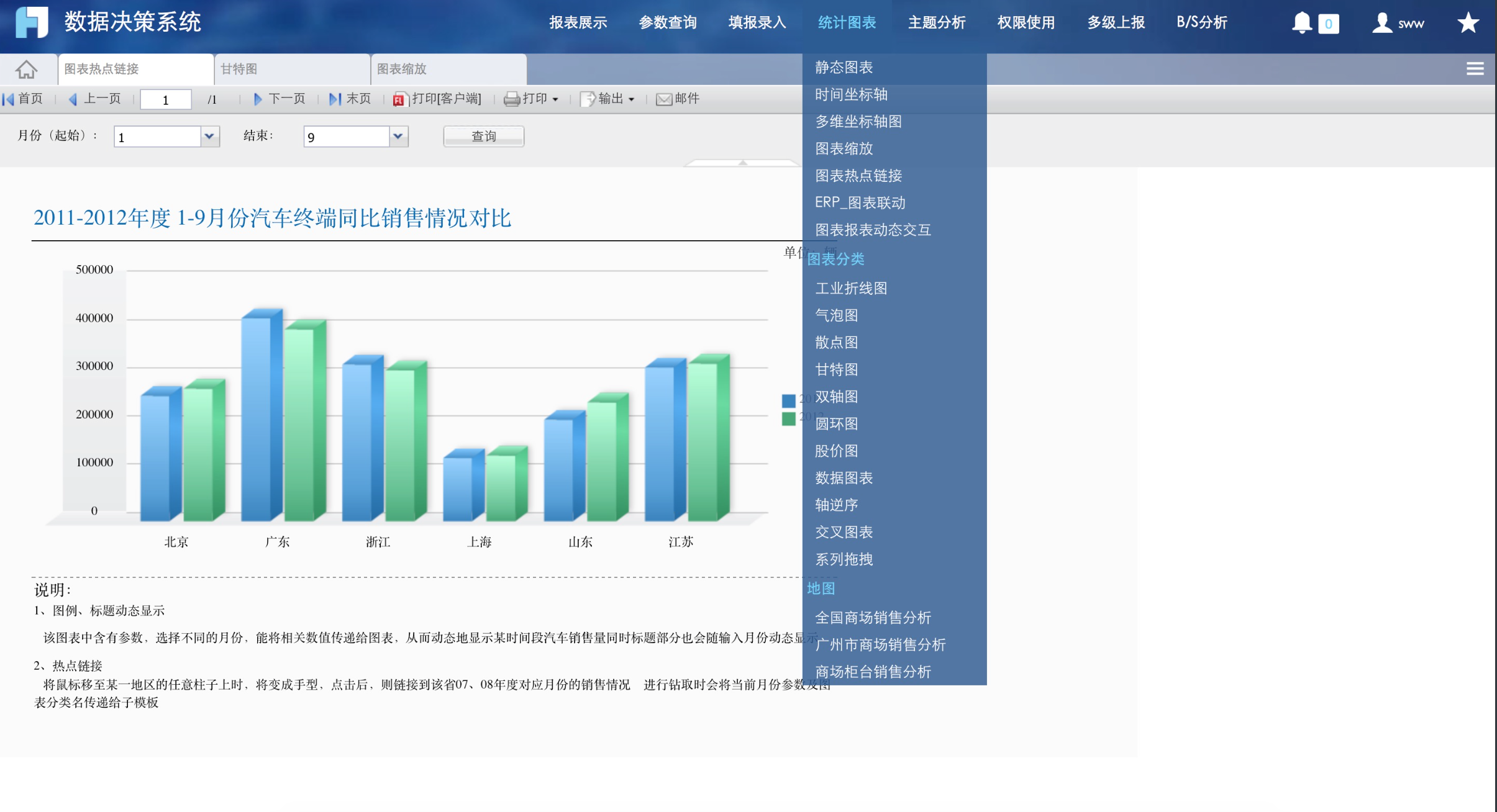
效果图如下:
为了使用主题扩展接口,首先我们在theme.js里需要对FS.Plugin.CustomIcon配置进行扩展,theme.js的代码代码如下:
| Code Block | ||||
|---|---|---|---|---|
| ||||
(function($){
	//主题配置属性
	FS.THEME = $.extend(true, FS.THEME, {
        /**需要扩展的配置属性**/
    });

	//自定义图标需要扩展的接口
	FS.Plugin.CustomIcon.push({
		/*获取菜单节点的自定义图标*/
		getMenuNodeCustomIcon: function (icon) {
			return null;
		},
		/*添加自定义图标到图标列表*/
		addCustomIconItem : function(configSetting){
		},
		/*删除之前选中的自定义图标*/
		removePreCustomIconSelected : function(folders) {
		},
		/*添加自定义图标到目录节点上*/
		addItem2Folders : function(eachFolder, $folders) {
		},
		/*初始化已经选中的自定义图标*/
		initSelectedCustomIcon : function(selectedFolder) {
		},
		/*获取自定义图标的附件ID*/
		getCustomIconAttachID : function (folder) {
			return null;
		}
	});
})(jQuery); |
自定义图标的demo:
theme.js
| Code Block | ||||||||
|---|---|---|---|---|---|---|---|---|
| ||||||||
(function ($) {

    FS.Plugin.LookAndFeelSettings.push({
        item: function(ctx) {
            return {
                title: FR.i18nText(""),
                content: $("<div />")
            };
        },
        action: function (tabPane) {
        }
    });

    FS.THEME = $.extend(true, FS.THEME, {
		/**需要扩展的配置属性**/
    });

    FS.Plugin.CustomIcon.push({
        getMenuNodeCustomIcon: function (icon) {
            /*这边定义了一个op,用于处理图标图片的文件读取和加载,不同的主题op不能相同,否则会有冲突!*/
            /*这边定义了一个cmd=read_img,把png图标从文件中读入到内存以及缓存中*/
            var config = {
                url: FR.servletURL + '?op=custom_icon&cmd=read_img',
                data: {
                    id : icon
                }
            };
            var attach = FS.Sync.ajax(config);
            var $icon = $('<span/>').addClass("fs-menu-icon");
            /*这边定义了一个cmd=getattach,从缓存中获取之前读入的附件png图标,图片的文件名存入img的alt属性中,后续保存的时候也可以方便处理*/
            var url = FR.servletURL + ('?op=custom_icon&cmd=get_attach&id=' + attach.attachid + '&isAdjust=false');
            $('<img>').attr('src',url).attr('alt', attach.attachfile).addClass('fs-menu-node-icon').appendTo($icon);
            return $icon;
        },
        removePreCustomIconSelected : function(folders) {
            //选择之前先删除之前的选择
            var curFolder = $('.fs-icon-folder-item.selected .folder-icon', folders);
            $('.fs-icon-folder-item.selected .fs-folder-customIcon-selected', folders).remove();
            curFolder.removeAttr('style');
        },
        addCustomIconItem : function(configSetting){
            var self = configSetting;

            var config = {
                url: FR.servletURL + '?op=custom_icon&cmd=read_img',
                data: {
                    id : ''
                }
            };
            var completeFn = function (res, status) {
                var result = FR.jsonDecode(res.responseText);
                $.each(result, function(index, attach){
                    var $icon = $('<div class="fs-icon-item"/>').hover(function () {
                        $(this).addClass('icon-hover');
                    }, function () {
                        if (!$(this).hasClass('selected')) {
                            $(this).removeClass('icon-hover');
                        }
                    }).click(function () {
                        self.selectIconItem($(this));
                    });
                    var url = FR.servletURL + ('?op=custom_icon&cmd=get_attach&id=' + attach.attachid + '&isAdjust=false');
                    $('<img>').attr('src', url).attr('alt', attach.attachfile).addClass('fs-customIcon-list-item').appendTo($icon);
                    $icon.data('ENTRY', {text: attach,onSelect: function ($icon) {
                        var curFolder = $('.fs-icon-folder-item.selected .folder-icon', self.$folders);
                        //选择之前先删除之前的选择
                        $('.fs-icon-folder-item.selected .fs-folder-customIcon-selected', self.$folders).remove();
                        curFolder.removeAttr('style');

                        var url = $('.fs-customIcon-list-item', $icon).attr('src');
                        var altText = $('.fs-customIcon-list-item', $icon).attr('alt');
                        var img = $('<img>').attr('src',url).attr('alt', altText).addClass('fs-folder-customIcon-selected');
                        curFolder.attr('style', 'padding-left:0px').html("");
                        img.insertBefore($('.fs-icon-folder-item.selected .folder-icon', self.$folders));
                    }});
                    $icon.appendTo(self.$icons);
                });
            };
            FS.Async.ajax(config, completeFn);
        },
        addItem2FolderNodes : function(eachFolder, $folders) {
            var config = {
                url: FR.servletURL + '?op=custom_icon&cmd=read_img',
                data: {
                    id : eachFolder.value
                }
            };
            var attach = FS.Sync.ajax(config);
            if(attach.attachid && attach.attachfile) {
                var url = FR.servletURL + ('?op=custom_icon&cmd=get_attach&id=' + attach.attachid + '&isAdjust=false');
                $('<img>').attr('src', url).attr('alt', attach.attachfile).addClass('fs-folder-customIcon-selected').appendTo($folders);
                $('<i class="folder-icon"/>').attr('style', 'padding-left:0px').html("").appendTo($folders);
            }
        },
        initSelectedCustomIcon : function(selectedFolder) {
            var altText = $('.fs-folder-customIcon-selected', selectedFolder).attr('alt');
            $.each(FSCS.View.$icons.children(), function(i, folderIcon){
                if (($('.fs-customIcon-list-item', folderIcon).attr('alt'))) {
                    if (altText === ($('.fs-customIcon-list-item', folderIcon).attr('alt'))) {
                        FSCS.View.selectIconItem(FSCS.View.$icons.children().eq(i));
                    }
                }
            })
        },
        getCustomIconAttachID : function (folder) {
            //寻找自定义的图标img的alt值
            return ($('.fs-folder-customIcon-selected', $(folder)).attr('alt'));
        }
    });

})(jQuery); |
style.css
| Code Block | ||||||||
|---|---|---|---|---|---|---|---|---|
| ||||||||
.fs-menu-node-icon {
    width: 25px;
    height: 16px;
}

.fs-folder-customIcon-selected {
    width:25px;
    height:16px;
    padding-left:10px;
}

.fs-customIcon-list-item {
    width:80px;
    height:80px
} |
对应的后台处理以及完整的代码见示例demo
| View file | ||||
|---|---|---|---|---|
|
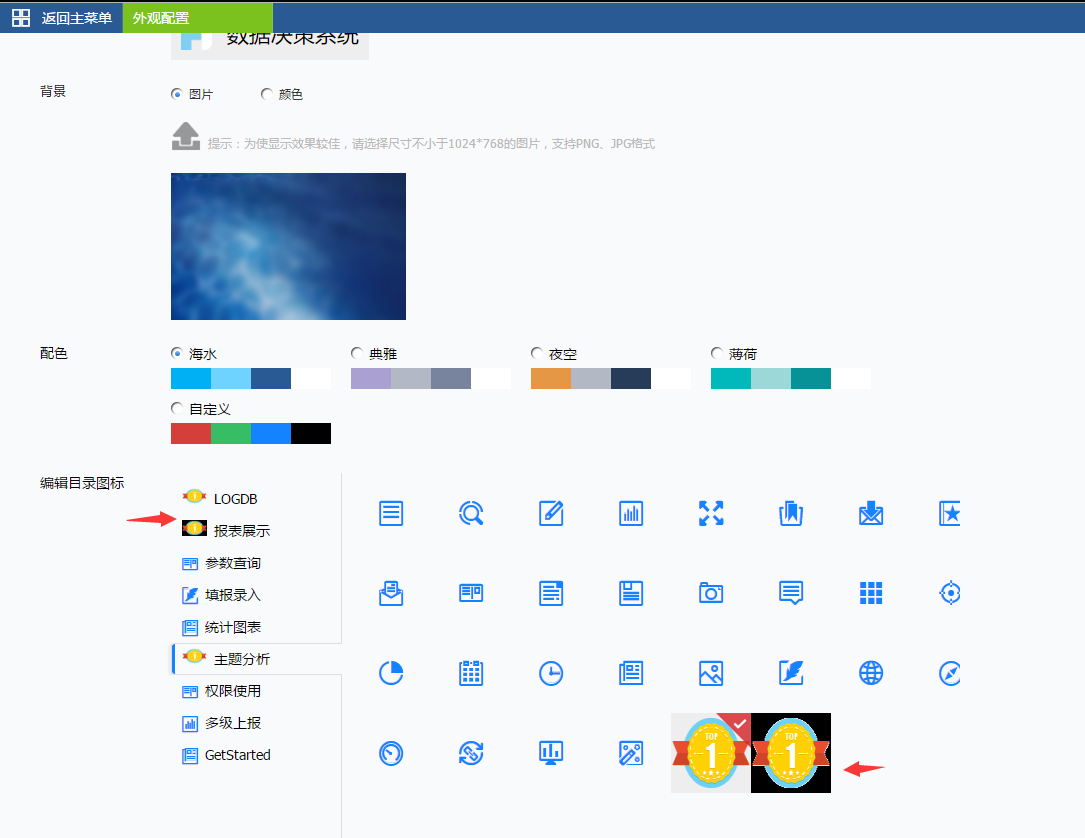
效果图如下:
在编辑目录图标的下方可以识别指定目录下的png图片,然后加载进来,以供选择,图片的大小尺寸请自行调整(示例上是80*80)
系统配色
系统配色主要有4种:高亮色、图标外框色、底栏色和文字色,可通过复写css来修改任意地方的样式或者配色


- 颜色1——高亮色。“收藏”“消息”“个人中心”三个图标选中状态及tab选中项提亮色,
- 颜色2——图标外框色。导航栏图标外围色;
- 颜色3——底栏色。左侧导航栏激活项背景色以及Tab栏背景颜色;
- 颜色4——文字色。字体颜色。
系统配色分别对应如下css样式:
| Code Block | ||||
|---|---|---|---|---|
| ||||
.fui-bsb{ background-color: @color; } .fui-bsc{ color: @color; } .fui-bsd{ border-color: @color; } |
| Code Block | ||||
|---|---|---|---|---|
| ||||
.fui-fhc } else { childs.push(child); } }); }; })(jQuery); |
效果图如下:
系统配色
系统配色主要有4种:高亮色、图标外框色、底栏色和文字色,可通过复写css来修改任意地方的样式或者配色
- 颜色1——高亮色。“收藏”“消息”“个人中心”三个图标选中状态及tab选中项提亮色,
- 颜色2——图标外框色。导航栏图标外围色;
- 颜色3——底栏色。左侧导航栏激活项背景色以及Tab栏背景颜色;
- 颜色4——文字色。字体颜色。
系统配色分别对应如下css样式:
color: @color;
}
.fui-fht{
  text-shadow: 0 0 3px @color;
} |
| Code Block | ||||
|---|---|---|---|---|
| ||||
.fui-bsbseb{ background-color: @color; } |
| Code Block | ||||
|---|---|---|---|---|
| ||||
.fui-bscfbc{ color: @color; } .fui-bsdfbt{ bordertext-color: @color; } |
| Code Block | ||||
|---|---|---|---|---|
| ||||
.fui-fhc{
  color: @color;
}
.fui-fht{
  text-shadow: 0 0 3px @color;
} |
| Code Block | ||||
|---|---|---|---|---|
| ||||
.fui-seb{
  background-color: @color;
} |
| Code Block | ||||
|---|---|---|---|---|
| ||||
.fui-fbc{
  color: @color;
}
.fui-fbt{
  text-shadow: 0 0 1px @color;
} |
请求接口
获取管理系统节点
shadow: 0 0 1px @color;
} |
请求接口
获取管理系统节点
| 请求 | 参数 |
|---|---|
| FR.servletURL + "?op=fs_main&cmd=getmoduleitems" | {id: -1} |
获取目录树节点
| 请求 | 参数 |
|---|---|
| FR.servletURL + "?op=fs_main&cmd=module_getrootreports" | {id: -1} |
(BI)获取我创建的列表
| 请求 | 参数 | callback |
|---|---|---|
| FR.servletURL + "?op=fr_bi&cmd=get_folder_report_list" | {} | [{lastModify:1466402196217,pId:"-1","id":"1",text:"功能演示",value:"348602efbb80f686"}] |
(BI)新建分析
| 请求 | 参数 | callback |
|---|---|---|
| FR.servletURL + "?op=fr_bi&cmd=add_report" | {reportName:'模板名', reportLocation: '我是模板文件夹的id', realTime: false} | {"reportId":23} |
(BI)模板超链
| 请求 | 参数 | callback |
|---|
| FR.servletURL + "?op= |
| fr_ |
| bi&cmd |
| =init_dezi_pane&reportId=23&edit=_bi_edit_" |
(BI)数据配置超链
| 请求 | 参数 | callback |
|---|---|---|
| FR.servletURL + "?op= |
| fr_bi_ |
| configure&cmd= |
| init_configure_ |
| pane" |
标签页单独集成
FS.loadModule(render, moduleName)
方法:根据模块名加载对应模块配置页面,用于集成独立页面
参数: render 渲染dom
      moduleName 模块名
例如:FS.loadModule($('<div/>').appendTo('body'), 'report');
集成并加载指定标签模块,模块名列表如下:
| 模块名 | 参数值 |
|---|---|
| 报表管理 | report |
| 用户管理 | user |
| 权限管理 | privilege |
| 定时调度 | schedule |
| 系统管理 | sysmgr |
| 平台外观 | lookandfeel |
| 注册信息 | register |
| 系统监控 | monitor |
| 移动平台 | mobile |
注: 必须先做单点登录,只有登录FS才有访问标签页的权限。注:必须先做单点登录,只有登录FS才有访问标签页的权限。
用户注销
FS.signOut()
方法:注销当前登录的用户,并返回登录页面。
参数:无。
Overview
Content Tools