
【仅供内部供应商使用,不提供对外解答和培训】
Page History
| Table of Contents |
|---|
需求来源
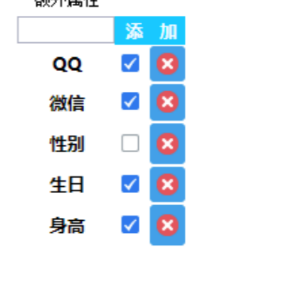
月入两万的开发者左良咨询一个可删除的列表怎么实现开发者咨询一个可删除的列表怎么实现

思路
实际上这是个自定义组件和button_group灵活使用的案例
...
添加节点和删除节点都通过简单的populate来实现.
同时监听button_group的事件来保存节点选中状态
| Code Block |
|---|
!(function () {

    var List = BI.inherit(BI.Widget, {

        props: {
            baseCls: "mydec-frame-listbody",
            items: [{
                text: "1",
                value: 1
            }, {
                text: "2",
                value: 2
            }]
        },

        render: function () {
            var self = this, o = this.options;

            return {
                type: "bi.vertical",
                items: [
                    {
                        el: {
                            type: "bi.button",
                            text: "添加一个",
                            handler: function () {
                                self._addOne();
                            }
                        }
                    }, {
                        el: {
                            type: "bi.button_group",
                            ref: function (_ref) {
                                self.list = _ref;
                            },
                            layouts: [
                                {
                                    type: "bi.vertical"
                                }
                            ],
                            chooseType: BI.Selection.MultiSingle,
                            scrolly: true,
                            items: this._formatItems(o.items),
							listeners: [
    							{
        							eventName: "EVENT_CHANGE",
          }							action: function () {
            							self._handleSelect();
        							}
    							}
							]
						}
                    }
                ]
            };
        },

        _addOne: function () {
          }
  this.options.items.push({
              ]
  text: BI.UUID(),
         };
        },

value: BI.UUID()
         _addOne:  function (}) {;
            this.populate(this.options.items.push({);
        },

        text_deleteOne: BI.UUIDfunction (value), {
            this.options.items =   value: BI.UUID()
     filter(this.options.items, function (index, item) {
       });
         return item.value  this.populate(this.options.items);
    !== value;
    },

        _deleteOne: function (value) {});
            this.options.items = BI.filterpopulate(this.options.items, function (index, item) {);
        },

		_handleSelect: function () {
		    var return item.valueselectedValues !== valuethis.getValue();
            });		BI.each(this.options.items, function (index, item) {
        		item.selected =   thisBI.populate(this.options.itemscontains(selectedValues, item.value);
        		});
		},

        		_formatItems: function (items) {
            var self = this;
            return BI.map(items, function (index, item) {
                return BI.extend({
                    type: "dec.demo.item",
                    listeners: [
                        {
                            eventName: "EVENT_DELETE",
                            action: function (value) {
                                self._deleteOne(value);
                            }
                        }
                    ]
                }, item);
            });
        },

        getValue: function () {
            return this.list.getValue();
        },

        populate: function (items) {
            this.list.populate(this._formatItems(items));
        }
    });

    BI.shortcut("dec.demo", List);
}()); |
效果示例

Overview
Content Tools