
【仅供内部供应商使用,不提供对外解答和培训】
Page History
...
| Code Block | ||||||
|---|---|---|---|---|---|---|
| ||||||
<extra-core>
    <CustomComponentProvider
            class="com.finebi.plugin.tptj.ivan.chart.demo.amap.MapHotComponentProvider"/>
</extra-core> |
效果图
| Expand | ||
|---|---|---|
| ||
|

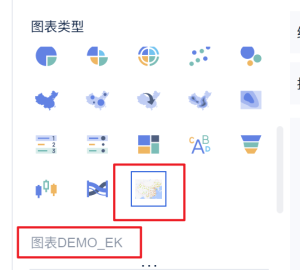
二、向前端图表类型添加对应的配置
...
| Code Block | ||||
|---|---|---|---|---|
| ||||
{
  "dataRegions": [
    {
      "name": "lat",
      "text": "Plugin-DEMO_WEB_LAT"
    },
    {
      "name": "lng",
      "text": "Plugin-DEMO_WEB_LNG"
    }
  ],
  "attrRegions": [
    {
      "name": "细粒度",
      "text": "Plugin-DEMO_WEB_FG",
      "multiFields": false,
      "settings": []
    }
  ],
  "chartStyles": [
    {
      "name": "mapProp",
      "text": "Plugin-DEMO_WEB_MAP_ATTRIBUTE",
      "multiFields": true,
      "settings": [
        {
          "name": "centerLng",
          "text": "Plugin-DEMO_WEB_CENTER_LNG",
          "type": "Input",
          "defaultValue": "102.3716"
        },
        {
          "name": "centerLat",
          "text": "Plugin-DEMO_WEB_CENTER_LAT",
          "type": "Input",
          "defaultValue": "36.6808"
        },
        {
          "name": "defaultZoom",
          "text": "Plugin-DEMO_WEB_DEFAULT_ZOOM",
          "type": "Input",
          "defaultValue": "4"
        },
        {
          "name": "style",
          "text": "Plugin-DEMO_WEB_STYLE",
          "type": "Select",
          "defaultValue": "normal",
          "items": [
            {
              "text": "标准",
              "value": "normal"
            },
            {
              "text": "幻影黑",
              "value": "dark"
            },
            {
              "text": "月光银",
              "value": "light"
            },
            {
              "text": "远山黛",
              "value": "whitesmoke"
            },
            {
              "text": "草色青",
              "value": "fresh"
            },
            {
              "text": "雅士灰",
              "value": "grey"
            },
            {
              "text": "涂鸦",
              "value": "graffiti"
            },
            {
              "text": "马卡龙",
              "value": "macaron"
            },
            {
              "text": "靛青蓝",
              "value": "blue"
            },
            {
              "text": "极夜蓝",
              "value": "darkblue"
            },
            {
              "text": "酱籽",
              "value": "wine"
            }
          ]
        }
      ]
    }
  ]
} |
效果图
| Expand | ||
|---|---|---|
| ||
|

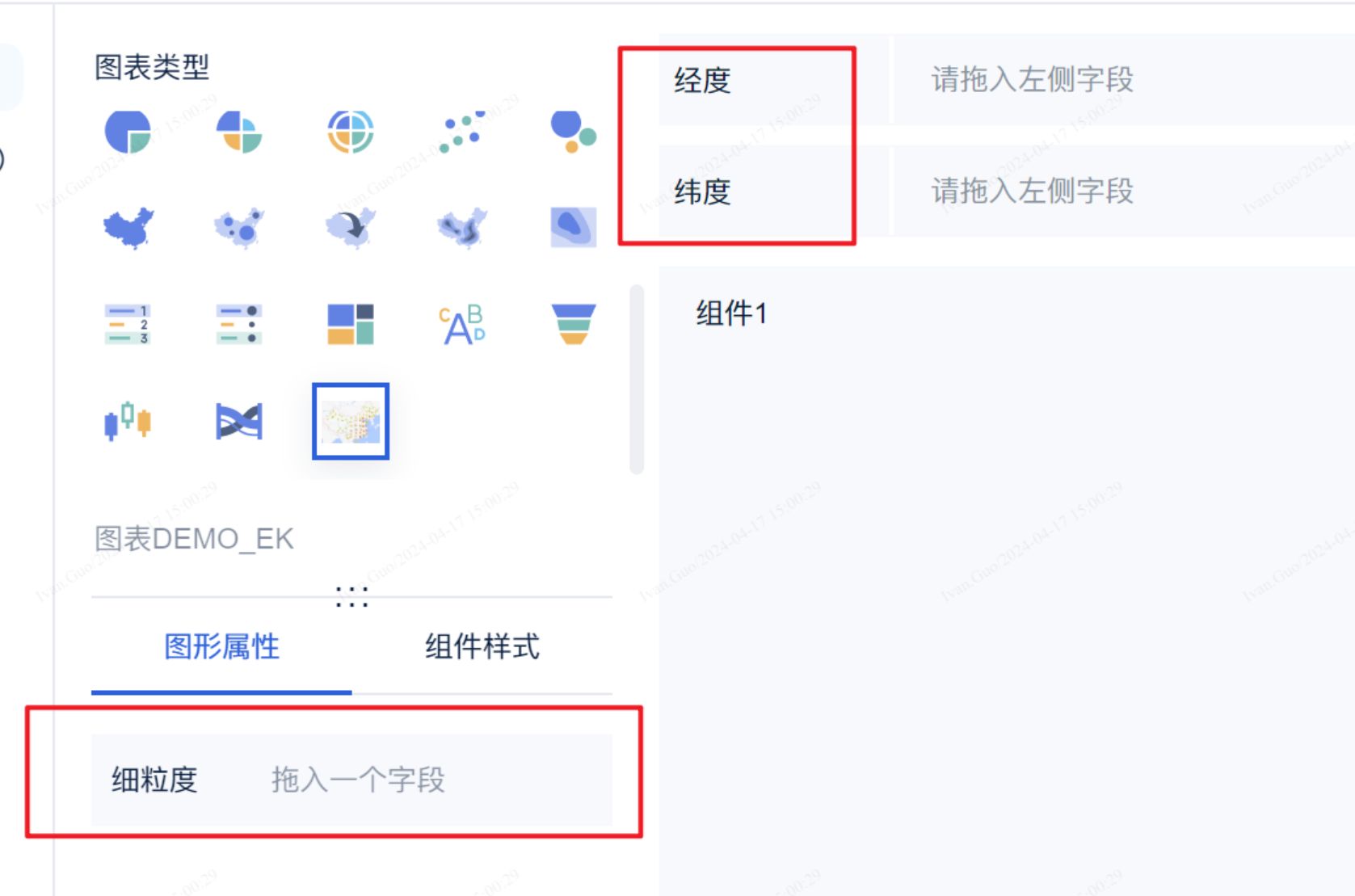

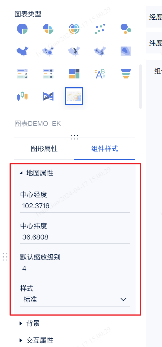
JSON配置文件说明
- dataRegions
- 格式:JSONARRAY
- 含义:数据
- 说明:目前最多支持两条,写多了不生效(不确定后续会不会增加)
- attrRegions
- 格式:JSONARRAY
- 含义:图形属性
- settings:代表其类型
- 支持的格式:JSONARRAY、color、size、symbol、Checkbox、RadioGroup、Segment、Select、ColorPicker、Input
- chartStyles
- 格式:JSONARRAY
- 含义:组件样式
- type:代表其类型
- 支持的格式:Checkbox、RadioGroup、Segment、Select、ColorPicker、Input
...
| Code Block | ||||||
|---|---|---|---|---|---|---|
| ||||||
(function ($) {
  function render(
    data, // 数据
    config, // 配置
    saveSessionCallback,
    closeSessionCallBack,
    extensionCallBack
  ) {
    // 查找初始化时的dom对象,该对象在 AbstractCustomComponentProvider#getPreviewPageHTML 方法中定义
    const dom = document.getElementById("amap-demo-container");

    // 一定要设置 宽高   不然图表渲染不出来
    dom.style.width = document.body.clientWidth + "px";
    dom.style.height = document.body.clientHeight + "px";

    // 获取配置项
    const mapAttribute = config["chartStyle"]["地图属性"]["value"];

    // 地图组件初始化
    const map = new AMap.Map(dom, {
      resizeEnable: true,
      center: [mapAttribute[0], mapAttribute[1]],
      zoom: mapAttribute[2],
    });

    // 地图设置样式
    const styleName = "amap://styles/" + mapAttribute[3];
    map.setMapStyle(styleName);

    window.addEventListener("resize", function () {
      dom.style.width = document.body.clientWidth + "px";
      dom.style.height = document.body.clientHeight + "px";
    });
  }

  // 注册渲染方法
  new BIPlugin().init(render);
})(jQuery); |
效果图
| Expand | ||
|---|---|---|
| ||
|

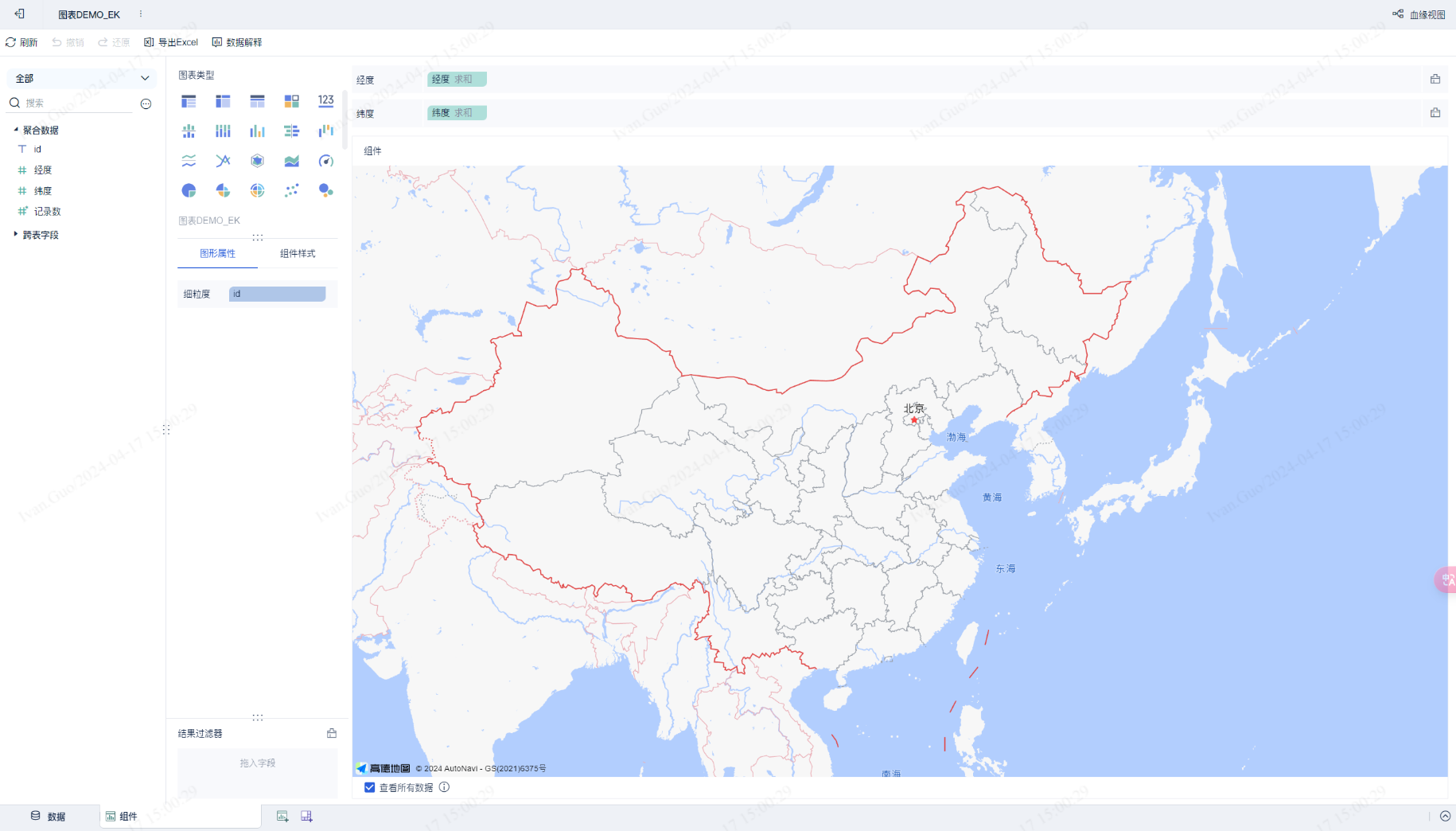
四、前端读取数据
上述js接口中,data代表其数据维度和指标,config内包含了图形属性和组件样式
...
效果图
| Expand | ||
|---|---|---|
| ||
通过细粒度进行划分
通过维度进行划分
|

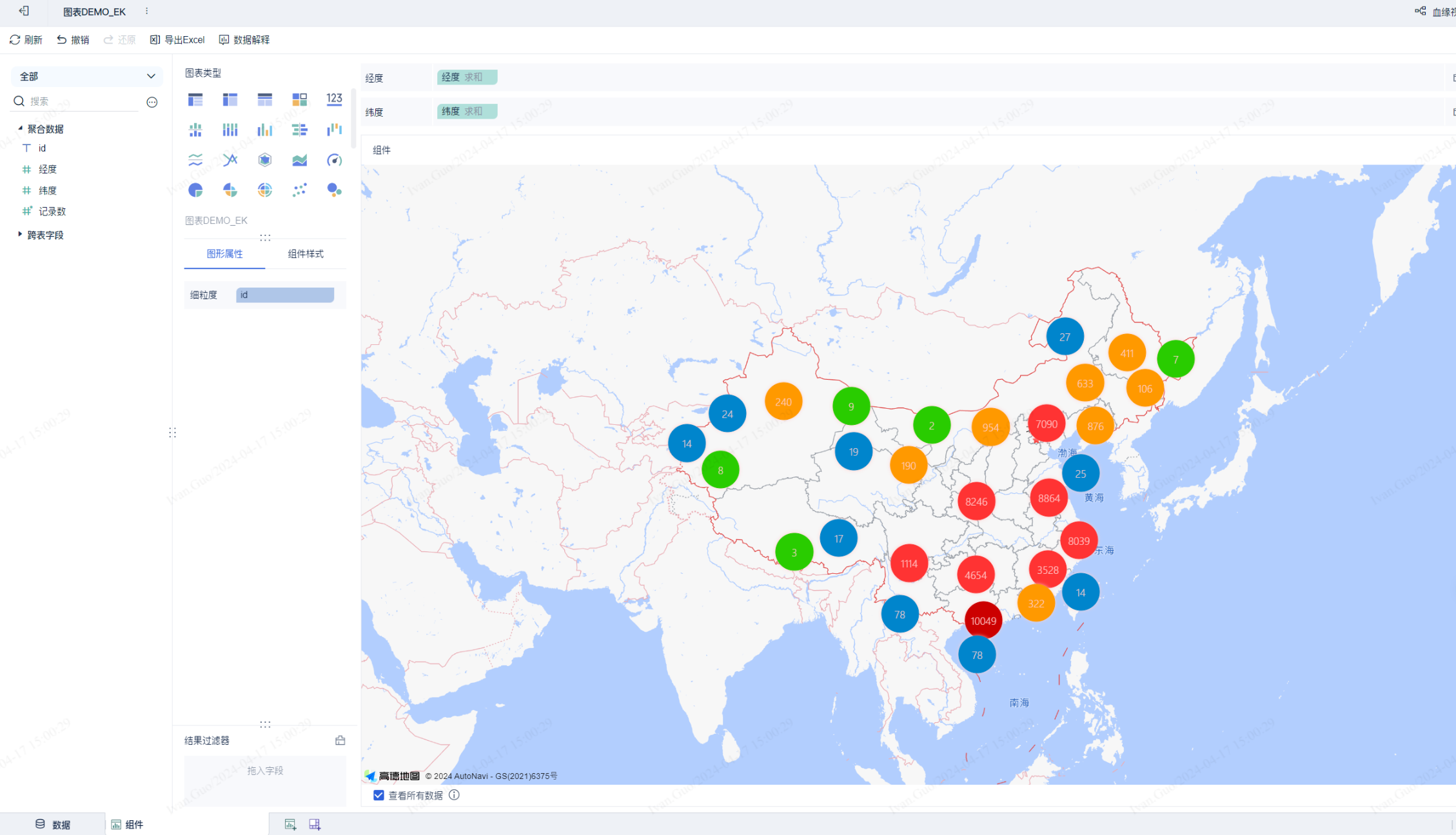

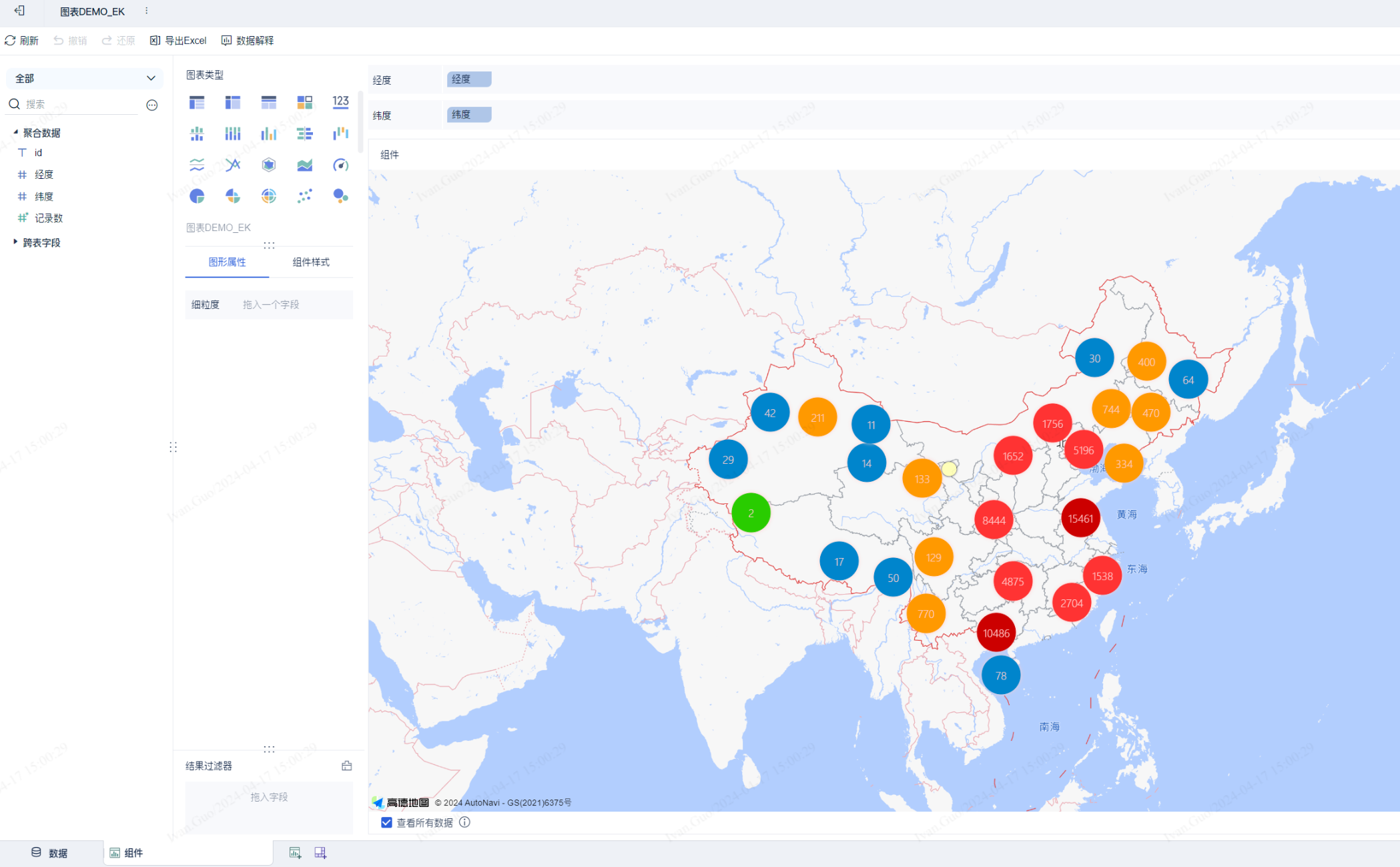
DEMO
...
| Code Block | ||||||
|---|---|---|---|---|---|---|
| ||||||
/**
    * 是否需要进行数据处理
    * true:需要
    * false:不需要
    * CustomComponentContext: 自定义图表相关配置
    */
@Override
public boolean needDataProcess(CustomComponentContext customComponentContext) {
    return true;
}

/**
    * 数据处理逻辑
    * needDataProcess返回true时才会生效
    * CustomComponentContext: 自定义图表相关配置
    */
@Override
public List<DataModel> process(List<DataModel> dataModels, CustomComponentContext customComponentContext) {
    return dataModels.stream().map(dataModel -> new DataModel() {
        @Override
        public List<Dimension> getFields() {
            return dataModel.getFields();
        }

        @Override
        public List<List<Object>> getColData() {
            List<List<Object>> colData = new ArrayList<>(dataModel.getFields().size());
            dataModel.getColData().forEach(d -> colData.add(Collections.singletonList(d.get((int) (Math.random() * d.size())))));
            return colData;
        }
    }).collect(Collectors.toList());
} |
效果图
| Expand | ||
|---|---|---|
| ||
|

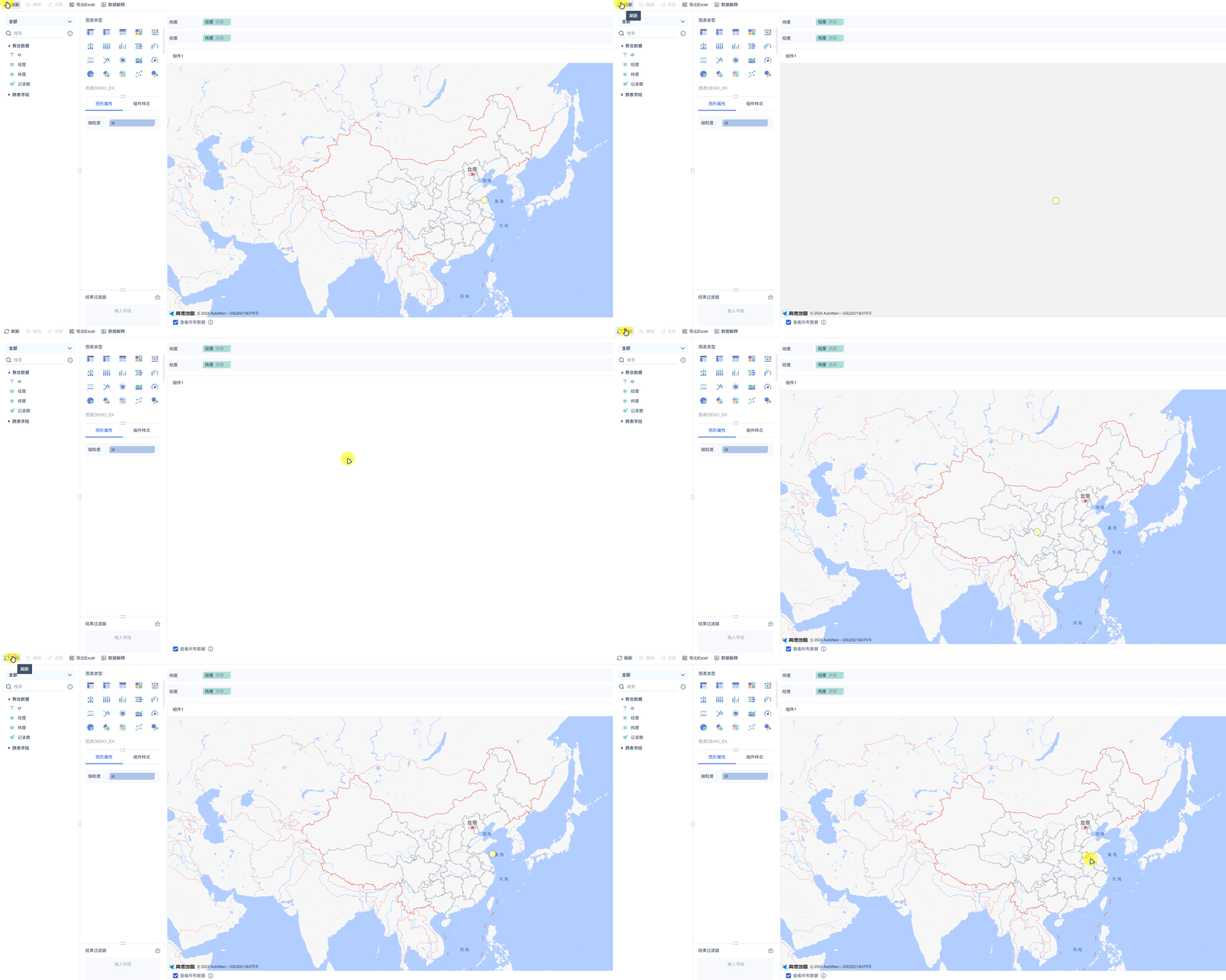
DEMO
...
| Code Block | ||||||
|---|---|---|---|---|---|---|
| ||||||
(function ($) {
    function render(
        data, // 数据
        config, // 配置
        saveSessionCallback,
        closeSessionCallBack,
        extensionCallBack
    ) {
        debugger;

        // 查找初始化时的dom对象
        const dom = document.getElementById("amap-demo-container");

        // 一定要设置 宽高   不然图表渲染不出来
        dom.style.width = document.body.clientWidth + "px";
        dom.style.height = document.body.clientHeight + "px";

        // 获取配置项
        const mapAttribute = config["chartStyle"]["mapProp"]["value"];

        // 地图组件初始化
        const map = new AMap.Map(dom, {
            resizeEnable: true,
            center: [mapAttribute[0], mapAttribute[1]],
            zoom: mapAttribute[2],
        });

        // 地图设置样式
        const styleName = "amap://styles/" + mapAttribute[3];
        map.setMapStyle(styleName);

        // 获取全部的经纬度点数据
        const points = _getAllPoint(data.dataMapping, data.dataModels[0]);

        if (points != null) {
            // 创建聚合点图层
            var pointCluster = new AMap.MarkerCluster(map, points, {
                gridSize: 60, // 设置网格像素大小
                renderClusterMarker: _renderCarClusterMarker, // 自定义聚合点样式
                renderMarker: _renderMarker,   // 自定义非聚合点样式
            });
        }


        window.addEventListener("resize", function () {
            dom.style.width = document.body.clientWidth + "px";
            dom.style.height = document.body.clientHeight + "px";
        });

        document.querySelector("#amap-demo-click").onclick = function () {
            extensionCallBack('refresh');
        }
    }

    /**
     * 自定义聚合点样式
     * @param context
     * @private
     */
    function _renderCarClusterMarker(context) {
        let count = context.count;
        let factor = context.count / count;
        const div = document.createElement('div');
        const Hue = 180 - factor * 180;
        let bgColor;
        if (context.count < 10) {
            bgColor = 'hsla(108,100%,40%,1)';
        } else if (context.count < 100) {
            bgColor = 'hsl(201,100%,40%)';
        } else if (context.count < 1000) {
            bgColor = 'hsla(36,100%,50%,1)';
        } else if (context.count < 10000) {
            bgColor = 'hsla(0,100%,60%,1)';
        } else {
            bgColor = 'hsla(0,100%,40%,1)';
        }
        const fontColor = 'hsla(' + Hue + ',100%,90%,1)';
        const borderColor = bgColor;
        const shadowColor = 'hsla(' + Hue + ',100%,90%,1)';
        div.style.backgroundColor = bgColor;
        const size = Math.round(30 + Math.pow(context.count / count, 1 / 5) * 20);
        div.style.width = div.style.height = size + 'px';
        div.style.border = 'solid 1px ' + borderColor;
        div.style.borderRadius = size / 2 + 'px';
        div.style.boxShadow = '0 0 5px ' + shadowColor;
        div.innerHTML = context.count;
        div.style.lineHeight = size + 'px';
        div.style.color = fontColor;
        div.style.fontSize = '14px';
        div.style.textAlign = 'center';
        context.marker.setOffset(new AMap.Pixel(-size / 2, -size / 2));
        context.marker.setContent(div)
    }

    /**
     * 自定义非聚合点样式
     * @param context
     * @private
     */
    function _renderMarker(context) {
        var content = '<div style="background-color: rgba(255,255,178,.9); height: 18px; width: 18px; border: 1px solid rgba(255,255,178,1); border-radius: 12px; box-shadow: rgba(0, 0, 0, 1) 0px 0px 3px;"></div>';
        var offset = new AMap.Pixel(-9, -9);
        context.marker.setContent(content)
        context.marker.setOffset(offset)
    }

    /**
     *
     * @param dataMapping
     * @param dataModel
     * @returns {*[]}
     * @private
     */
    function _getAllPoint(dataMapping, dataModel) {
        let lngId = dataMapping['lat'];
        let latId = dataMapping['lng'];

        let files = dataModel.fields;
        let rowCount = dataModel.rowCount
        const colData = dataModel.colData;

        let lngIndex;
        let latIndex;

        // demo这里没有考虑多维度多指标的情况,具体根据实际情况进行修改
        files.forEach((item, index) => {
            if (lngId.indexOf(item.id) >= 0) {
                lngIndex = index;
            }
            if (latId.indexOf(item.id) >= 0) {
                latIndex = index;
            }
        })

        var points = [];
        for (let i = 0; i < rowCount; i++) {
            points.push({
                lnglat: [colData[lngIndex][i], colData[latIndex][i]],
            })
        }

        return points;
    }

    // 注册渲染方法
    new BIPlugin().init(render);
})(jQuery); |
效果图
| Expand | ||
|---|---|---|
| ||
|

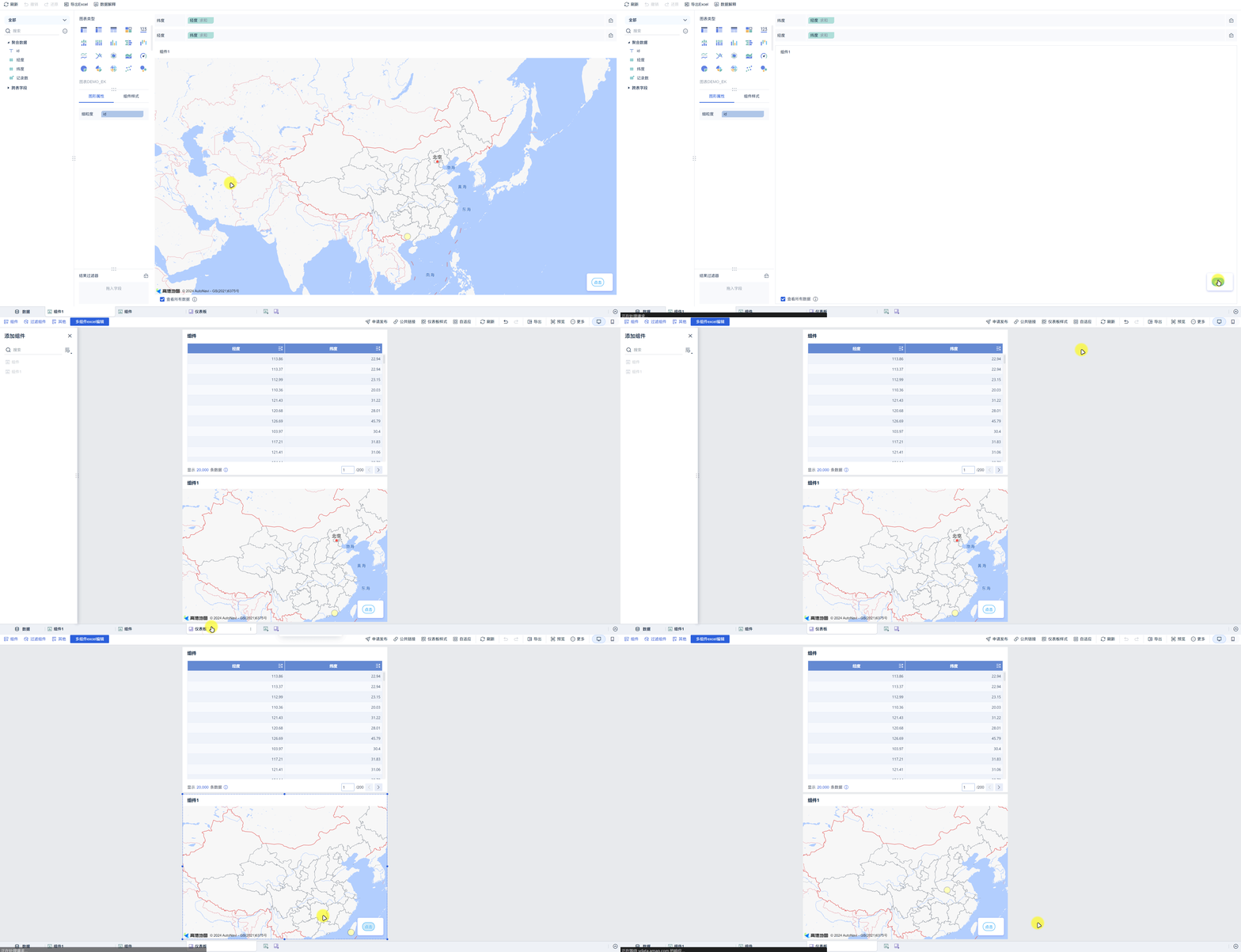
DEMO
...
| Code Block | ||||||
|---|---|---|---|---|---|---|
| ||||||
(function ($) {
    function render(
        data, // 数据
        config, // 配置
        saveSessionCallback,
        closeSessionCallBack,
        extensionCallBack
    ) {
        debugger;

        // 查找初始化时的dom对象
        const dom = document.getElementById("amap-demo-container");

        // 一定要设置 宽高   不然图表渲染不出来
        dom.style.width = document.body.clientWidth + "px";
        dom.style.height = document.body.clientHeight + "px";

        // 获取配置项
        const mapAttribute = config["chartStyle"]["mapProp"]["value"];

        // 地图组件初始化
        let map;
        let customConfig = config.customConfig;
        if (customConfig != null && JSON.stringify(customConfig).length > 2) {
            // 读取保存的配置
            map = new AMap.Map(dom, {
                resizeEnable: true,
                center: [customConfig.lng, customConfig.lat],
                zoom: customConfig.zoom,
            });
        } else {
            map = new AMap.Map(dom, {
                resizeEnable: true,
                center: [mapAttribute[0], mapAttribute[1]],
                zoom: mapAttribute[2],
            });
        }

        // 地图设置样式
        const styleName = "amap://styles/" + mapAttribute[3];
        map.setMapStyle(styleName);

        // 获取全部的经纬度点数据
        const points = _getAllPoint(data.dataMapping, data.dataModels[0]);

        if (points != null) {
            // 创建聚合点图层
            var pointCluster = new AMap.MarkerCluster(map, points, {
                gridSize: 60, // 设置网格像素大小
                renderClusterMarker: _renderCarClusterMarker, // 自定义聚合点样式
                renderMarker: _renderMarker,   // 自定义非聚合点样式
            });
        }


        window.addEventListener("resize", function () {
            dom.style.width = document.body.clientWidth + "px";
            dom.style.height = document.body.clientHeight + "px";
        });

        document.querySelector("#amap-demo-click").onclick = function () {
            let conf = {
                zoom: map.getZoom(),
                lng: map.getCenter().lng,
                lat: map.getCenter().lat,
            };
            // 保存配置
            saveSessionCallback(conf);
            extensionCallBack('refresh');
        }
    }

    /**
     * 自定义聚合点样式
     * @param context
     * @private
     */
    function _renderCarClusterMarker(context) {
        let count = context.count;
        let factor = context.count / count;
        const div = document.createElement('div');
        const Hue = 180 - factor * 180;
        let bgColor;
        if (context.count < 10) {
            bgColor = 'hsla(108,100%,40%,1)';
        } else if (context.count < 100) {
            bgColor = 'hsl(201,100%,40%)';
        } else if (context.count < 1000) {
            bgColor = 'hsla(36,100%,50%,1)';
        } else if (context.count < 10000) {
            bgColor = 'hsla(0,100%,60%,1)';
        } else {
            bgColor = 'hsla(0,100%,40%,1)';
        }
        const fontColor = 'hsla(' + Hue + ',100%,90%,1)';
        const borderColor = bgColor;
        const shadowColor = 'hsla(' + Hue + ',100%,90%,1)';
        div.style.backgroundColor = bgColor;
        const size = Math.round(30 + Math.pow(context.count / count, 1 / 5) * 20);
        div.style.width = div.style.height = size + 'px';
        div.style.border = 'solid 1px ' + borderColor;
        div.style.borderRadius = size / 2 + 'px';
        div.style.boxShadow = '0 0 5px ' + shadowColor;
        div.innerHTML = context.count;
        div.style.lineHeight = size + 'px';
        div.style.color = fontColor;
        div.style.fontSize = '14px';
        div.style.textAlign = 'center';
        context.marker.setOffset(new AMap.Pixel(-size / 2, -size / 2));
        context.marker.setContent(div)
    }

    /**
     * 自定义非聚合点样式
     * @param context
     * @private
     */
    function _renderMarker(context) {
        var content = '<div style="background-color: rgba(255,255,178,.9); height: 18px; width: 18px; border: 1px solid rgba(255,255,178,1); border-radius: 12px; box-shadow: rgba(0, 0, 0, 1) 0px 0px 3px;"></div>';
        var offset = new AMap.Pixel(-9, -9);
        context.marker.setContent(content)
        context.marker.setOffset(offset)
    }

    /**
     *
     * @param dataMapping
     * @param dataModel
     * @returns {*[]}
     * @private
     */
    function _getAllPoint(dataMapping, dataModel) {
        let lngId = dataMapping['lat'];
        let latId = dataMapping['lng'];

        let files = dataModel.fields;
        let rowCount = dataModel.rowCount
        const colData = dataModel.colData;

        let lngIndex;
        let latIndex;

        // demo这里没有考虑多维度多指标的情况,具体根据实际情况进行修改
        files.forEach((item, index) => {
            if (lngId.indexOf(item.id) >= 0) {
                lngIndex = index;
            }
            if (latId.indexOf(item.id) >= 0) {
                latIndex = index;
            }
        })

        var points = [];
        for (let i = 0; i < rowCount; i++) {
            points.push({
                lnglat: [colData[lngIndex][i], colData[latIndex][i]],
            })
        }

        return points;
    }

    // 注册渲染方法
    new BIPlugin().init(render);
})(jQuery); |
效果图
| Expand | ||
|---|---|---|
| ||
|


DEMO
四、组件联动(click仅支持数据联动 已废弃,不再使用)
场景:点击时联动仪表板内的其他组件

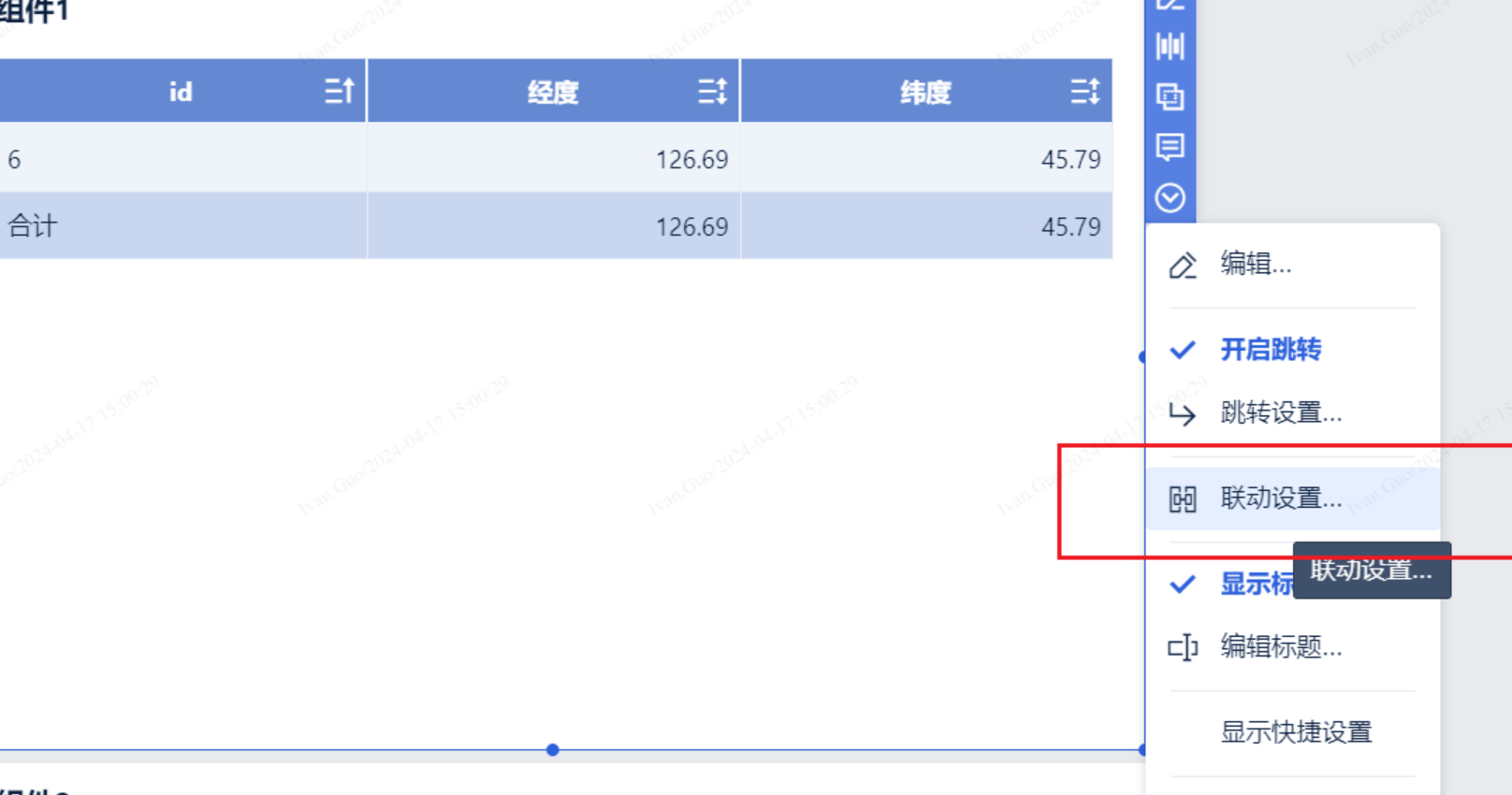
实现方式
| Code Block | ||||||
|---|---|---|---|---|---|---|
| ||||||
const currentClicked = {
    dId: id,
    value: val
};
extensionCallBack(
    'click',
    currentClicked
); |
...
| Code Block | ||||||
|---|---|---|---|---|---|---|
| ||||||
(function ($) {
    function render(
        data, // 数据
        config, // 配置
        saveSessionCallback,
        closeSessionCallBack,
        extensionCallBack
    ) {
        debugger;

        // 查找初始化时的dom对象
        const dom = document.getElementById("amap-demo-container");

        // 一定要设置 宽高   不然图表渲染不出来
        dom.style.width = document.body.clientWidth + "px";
        dom.style.height = document.body.clientHeight + "px";

        const {
            // 数据,若横纵轴多指标时图表属性有维度字段,dataModels 为以图表属性为分组的多组数据
            dataModels,
            // 横纵轴拖入字段的维度 id
            dataMapping,
            // 图表属性拖入字段的维度 id
            chartAttrMapping,
            // 图表点击值
            clicked
        } = data;

        const {
            // 组件 id
            widgetId,
            // 全局样式中图表最终样式
            globalStyles,
            // 图表属性配置所选值
            chartAttr,
            // 图表样式配置所选值
            chartStyle,
            // 图标属性中使用形状时的图标映射
            symbolIconMap,
            // 自定义保存的值(saveSessionCallback)
            customConfig
        } = config;

        // 获取配置项
        const mapAttribute = chartStyle["mapProp"]["value"];

        // 地图组件初始化
        let map;
        if (customConfig != null && JSON.stringify(customConfig).length > 2) {
            // 读取保存的配置
            map = new AMap.Map(dom, {
                resizeEnable: true,
                center: [customConfig.lng, customConfig.lat],
                zoom: customConfig.zoom,
            });
        } else {
            map = new AMap.Map(dom, {
                resizeEnable: true,
                center: [mapAttribute[0], mapAttribute[1]],
                zoom: mapAttribute[2],
            });
        }

        // 地图设置样式
        const styleName = "amap://styles/" + mapAttribute[3];
        map.setMapStyle(styleName);

        // 获取全部的经纬度点数据
        const points = _getAllPoint(dataMapping, dataModels[0]);

        if (points != null) {
            // 创建聚合点图层
            var pointCluster = new AMap.MarkerCluster(map, points, {
                gridSize: 60, // 设置网格像素大小
                renderClusterMarker: _renderCarClusterMarker, // 自定义聚合点样式
                renderMarker: _renderMarker,   // 自定义非聚合点样式
            });
        }


        window.addEventListener("resize", function () {
            dom.style.width = document.body.clientWidth + "px";
            dom.style.height = document.body.clientHeight + "px";
        });

        document.querySelector("#amap-demo-click").onclick = function () {
            let conf = {
                zoom: map.getZoom(),
                lng: map.getCenter().lng,
                lat: map.getCenter().lat,
            };
            // 保存配置
            saveSessionCallback(conf);
            extensionCallBack('refresh');
        }

        /**
         * 自定义聚合点样式
         * @param context
         * @private
         */
        function _renderCarClusterMarker(context) {
            let count = context.count;
            let factor = context.count / count;
            const div = document.createElement('div');
            const Hue = 180 - factor * 180;
            let bgColor;
            if (context.count < 10) {
                bgColor = 'hsla(108,100%,40%,1)';
            } else if (context.count < 100) {
                bgColor = 'hsl(201,100%,40%)';
            } else if (context.count < 1000) {
                bgColor = 'hsla(36,100%,50%,1)';
            } else if (context.count < 10000) {
                bgColor = 'hsla(0,100%,60%,1)';
            } else {
                bgColor = 'hsla(0,100%,40%,1)';
            }
            const fontColor = 'hsla(' + Hue + ',100%,90%,1)';
            const borderColor = bgColor;
            const shadowColor = 'hsla(' + Hue + ',100%,90%,1)';
            div.style.backgroundColor = bgColor;
            const size = Math.round(30 + Math.pow(context.count / count, 1 / 5) * 20);
            div.style.width = div.style.height = size + 'px';
            div.style.border = 'solid 1px ' + borderColor;
            div.style.borderRadius = size / 2 + 'px';
            div.style.boxShadow = '0 0 5px ' + shadowColor;
            div.innerHTML = context.count;
            div.style.lineHeight = size + 'px';
            div.style.color = fontColor;
            div.style.fontSize = '14px';
            div.style.textAlign = 'center';
            context.marker.setOffset(new AMap.Pixel(-size / 2, -size / 2));
            context.marker.setContent(div)
        }

        /**
         * 自定义非聚合点样式
         * @param context
         * @private
         */
        function _renderMarker(context) {
            var content = '<div style="background-color: rgba(255,255,178,.9); height: 18px; width: 18px; border: 1px solid rgba(255,255,178,1); border-radius: 12px; box-shadow: rgba(0, 0, 0, 1) 0px 0px 3px;"></div>';
            var offset = new AMap.Pixel(-9, -9);
            context.marker.setContent(content)
            context.marker.setOffset(offset)
            let datum = context.data[0];
            let id = datum.idId;
            const val = [
                {
                    dId: datum.idId,
                    text: datum.idVal,
                },
                // {
                //     dId: datum.lngId,
                //     text: datum.lngVal,
                // },
                // {
                //     dId: datum.latId,
                //     text: datum.latVal,
                // }
            ];

            /**
             * dId: 当前维度的Id
             * value: 当前维度和之前维度的id及对应值  (不是全部的维度信息!)
             */
            const currentClicked = {
                dId: id,
                value: val
            };

            context.marker.on('click', ev => {
                debugger;
                // 触发联动
                extensionCallBack(
                    'click',
                    currentClicked
                );
            })
        }

    }

    /**
     *
     * @param dataMapping
     * @param dataModel
     * @returns {*[]}
     * @private
     */
    function _getAllPoint(dataMapping, dataModel) {
        let lngId = dataMapping['lng'];
        let latId = dataMapping['lat'];

        let files = dataModel.fields;
        let rowCount = dataModel.rowCount
        const colData = dataModel.colData;

        let lngIndex;
        let latIndex;
        let idIndex;

        // demo这里没有考虑多维度多指标的情况,具体根据实际情况进行修改
        files.forEach((item, index) => {
            if (lngId.indexOf(item.id) >= 0) {
                lngIndex = index;
            } else if (latId.indexOf(item.id) >= 0) {
                latIndex = index;
            } else {
                idIndex = index;
            }
        })

        var points = [];
        for (let i = 0; i < rowCount; i++) {
            points.push({
                lnglat: [colData[lngIndex][i], colData[latIndex][i]],
                lngId: files[lngIndex].id,
                latId: files[latIndex].id,
                idId: files[idIndex].id,
                lngVal: colData[lngIndex][i],
                latVal: colData[latIndex][i],
                idVal: colData[idIndex][i],
            })
        }

        return points;
    }

    // 注册渲染方法
    new BIPlugin().init(render);
})(jQuery); |
效果图
| Expand | ||
|---|---|---|
| ||
|


DEMO
五、组件联动(dimensionSelected,支持跳转和联动)
...
| Code Block | ||||||
|---|---|---|---|---|---|---|
| ||||||
(function ($) {
    function render(
        data, // 数据
        config, // 配置
        saveSessionCallback,
        closeSessionCallBack,
        extensionCallBack
    ) {
        debugger;

        // 查找初始化时的dom对象
        const dom = document.getElementById("amap-demo-container");

        // 一定要设置 宽高   不然图表渲染不出来
        dom.style.width = document.body.clientWidth + "px";
        dom.style.height = document.body.clientHeight + "px";

        const {
            // 数据,若横纵轴多指标时图表属性有维度字段,dataModels 为以图表属性为分组的多组数据
            dataModels,
            // 横纵轴拖入字段的维度 id
            dataMapping,
            // 图表属性拖入字段的维度 id
            chartAttrMapping,
            // 图表点击值
            clicked
        } = data;

        const {
            // 组件 id
            widgetId,
            // 全局样式中图表最终样式
            globalStyles,
            // 图表属性配置所选值
            chartAttr,
            // 图表样式配置所选值
            chartStyle,
            // 图标属性中使用形状时的图标映射
            symbolIconMap,
            // 自定义保存的值(saveSessionCallback)
            customConfig
        } = config;

        // 获取配置项
        const mapAttribute = chartStyle["mapProp"]["value"];

        // 地图组件初始化
        let map;
        if (customConfig != null && JSON.stringify(customConfig).length > 2) {
            // 读取保存的配置
            map = new AMap.Map(dom, {
                resizeEnable: true,
                center: [customConfig.lng, customConfig.lat],
                zoom: customConfig.zoom,
            });
        } else {
            map = new AMap.Map(dom, {
                resizeEnable: true,
                center: [mapAttribute[0], mapAttribute[1]],
                zoom: mapAttribute[2],
            });
        }

        // 地图设置样式
        const styleName = "amap://styles/" + mapAttribute[3];
        map.setMapStyle(styleName);

        // 获取全部的经纬度点数据
        const points = _getAllPoint(dataMapping, dataModels[0]);

        if (points != null) {
            // 创建聚合点图层
            var pointCluster = new AMap.MarkerCluster(map, points, {
                gridSize: 60, // 设置网格像素大小
                renderClusterMarker: _renderCarClusterMarker, // 自定义聚合点样式
                renderMarker: _renderMarker,   // 自定义非聚合点样式
            });
        }


        window.addEventListener("resize", function () {
            dom.style.width = document.body.clientWidth + "px";
            dom.style.height = document.body.clientHeight + "px";
        });

        document.querySelector("#amap-demo-click").onclick = function () {
            let conf = {
                zoom: map.getZoom(),
                lng: map.getCenter().lng,
                lat: map.getCenter().lat,
            };
            // 保存配置
            saveSessionCallback(conf);
            extensionCallBack('refresh');
        }

        /**
         * 自定义聚合点样式
         * @param context
         * @private
         */
        function _renderCarClusterMarker(context) {
            let count = context.count;
            let factor = context.count / count;
            const div = document.createElement('div');
            const Hue = 180 - factor * 180;
            let bgColor;
            if (context.count < 10) {
                bgColor = 'hsla(108,100%,40%,1)';
            } else if (context.count < 100) {
                bgColor = 'hsl(201,100%,40%)';
            } else if (context.count < 1000) {
                bgColor = 'hsla(36,100%,50%,1)';
            } else if (context.count < 10000) {
                bgColor = 'hsla(0,100%,60%,1)';
            } else {
                bgColor = 'hsla(0,100%,40%,1)';
            }
            const fontColor = 'hsla(' + Hue + ',100%,90%,1)';
            const borderColor = bgColor;
            const shadowColor = 'hsla(' + Hue + ',100%,90%,1)';
            div.style.backgroundColor = bgColor;
            const size = Math.round(30 + Math.pow(context.count / count, 1 / 5) * 20);
            div.style.width = div.style.height = size + 'px';
            div.style.border = 'solid 1px ' + borderColor;
            div.style.borderRadius = size / 2 + 'px';
            div.style.boxShadow = '0 0 5px ' + shadowColor;
            div.innerHTML = context.count;
            div.style.lineHeight = size + 'px';
            div.style.color = fontColor;
            div.style.fontSize = '14px';
            div.style.textAlign = 'center';
            context.marker.setOffset(new AMap.Pixel(-size / 2, -size / 2));
            context.marker.setContent(div)
        }

        /**
         * 自定义非聚合点样式
         * @param context
         * @private
         */
        function _renderMarker(context) {
            var content = '<div style="background-color: rgba(255,255,178,.9); height: 18px; width: 18px; border: 1px solid rgba(255,255,178,1); border-radius: 12px; box-shadow: rgba(0, 0, 0, 1) 0px 0px 3px;"></div>';
            var offset = new AMap.Pixel(-9, -9);
            context.marker.setContent(content)
            context.marker.setOffset(offset)
            let datum = context.data[0];
            // let id = datum.idId;
            // const val = [
            //     {
            //         dId: datum.idId,
            //         text: datum.idVal,
            //     },
            //     {
            //         dId: datum.lngId,
            //         text: datum.lngVal,
            //     },
            //     {
            //         dId: datum.latId,
            //         text: datum.latVal,
            //     }
            // ];

            // /**
            //  * dId: 当前维度的Id
            //  * value: 当前维度和之前维度的id及对应值  (不是全部的维度信息!)
            //  */
            // const currentClicked = {
            //     dId: id,
            //     value: val
            // };

            // context.marker.on('click', ev => {
            //     debugger;
            //     // 触发联动
            //     extensionCallBack(
            //         'click',
            //         currentClicked
            //     );
            // });

            const currentClicked = {
                [datum.idId]: datum.idVal,
                [datum.lngId]: datum.lngVal,
                [datum.latId]: datum.latVal
            };

            const currentId = datum.lngId
            context.marker.on('click', ev => {
                debugger;
                // 触发联动
                const demo = {
                    pos: {
                        x: window.event.pageX,
                        y: window.event.pageY,
                    },
                    // 点击指标的维度id
                    measure: currentId,
                    // 点击指标所在行的各个字段值,包括指标和维度
                    // id: 字段值
                    row: currentClicked,
                };
                // 点击指标事件(数据栏里是指标【绿色的】使用该方法)
                // extensionCallBack("pointSelected", demo);
                // 点击维度事件(数据栏里是维度【蓝色的】使用该方法)
                // extensionCallBack("dimensionSelected", demo);
                for (let i = 0; i < data.dataModels[0].fields.length; i++) {
                    let field = data.dataModels[0].fields[i];
                    if (field.id === currentId) {
                        // 这里判断用户的数据栏里是维度还是指标
                        if (field.isDimension) {
                            extensionCallBack("dimensionSelected", demo);
                        } else if (field.isMeasure) {
                            extensionCallBack("pointSelected", demo);
                        }
                        break;
                    }
                }
            });

        }

    }

    /**
     *
     * @param dataMapping
     * @param dataModel
     * @returns {*[]}
     * @private
     */
    function _getAllPoint(dataMapping, dataModel) {
        let lngId = dataMapping['lng'];
        let latId = dataMapping['lat'];

        let files = dataModel.fields;
        let rowCount = dataModel.rowCount
        const colData = dataModel.colData;

        let lngIndex;
        let latIndex;
        let idIndex;

        // demo这里没有考虑多维度多指标的情况,具体根据实际情况进行修改
        files.forEach((item, index) => {
            if (lngId.indexOf(item.id) >= 0) {
                lngIndex = index;
            } else if (latId.indexOf(item.id) >= 0) {
                latIndex = index;
            } else {
                idIndex = index;
            }
        })

        var points = [];
        for (let i = 0; i < rowCount; i++) {
            points.push({
                lnglat: [colData[lngIndex][i], colData[latIndex][i]],
                lngId: files[lngIndex].id,
                latId: files[latIndex].id,
                idId: files[idIndex].id,
                lngVal: colData[lngIndex][i],
                latVal: colData[latIndex][i],
                idVal: colData[idIndex][i],
            })
        }

        return points;
    }

    // 注册渲染方法
    new BIPlugin().init(render);
})(jQuery);
|
效果图
| Expand | ||
|---|---|---|
| ||
|


DEMO
Overview
Content Tools